The examples below walk through a complete service: a server that
exposes a few arithmetic methods, a synchronous client that calls
them, a client that fans several calls out concurrently, and a
client that talks to a server over TCP.
Example #1 Yar Server Example
A Yar service is just a regular PHP class wrapped by
Yar_Server. Every public method of the
object becomes an RPC endpoint; protected and private methods, as
well as methods whose names start with an underscore, stay hidden
from clients. The doc comments of the public methods are collected
and shown on the service information page.
RPC requests arrive as HTTP POST requests carrying a binary Yar
protocol payload, so the script is usually mapped to a URI on a
regular web server.
<?php

/* assume this page can be accessed by http://api.example.com/operator.php */

class Operator {

    /**
     * Add two operands
     * @param integer
     * @return integer
     */
    public function add($a, $b) {
        return $this->_add($a, $b);
    }

    /**
     * Sub
     */
    public function sub($a, $b) {
        return $a - $b;
    }

    /**
     * Mul
     */
    public function mul($a, $b) {
        return $a * $b;
    }

    /**
     * Protected methods will not be exposed
     * @param integer
     * @return integer
     */
    protected function _add($a, $b) {
        return $a + $b;
    }
}

$server = new Yar_Server(new Operator());
$server->handle();
?>
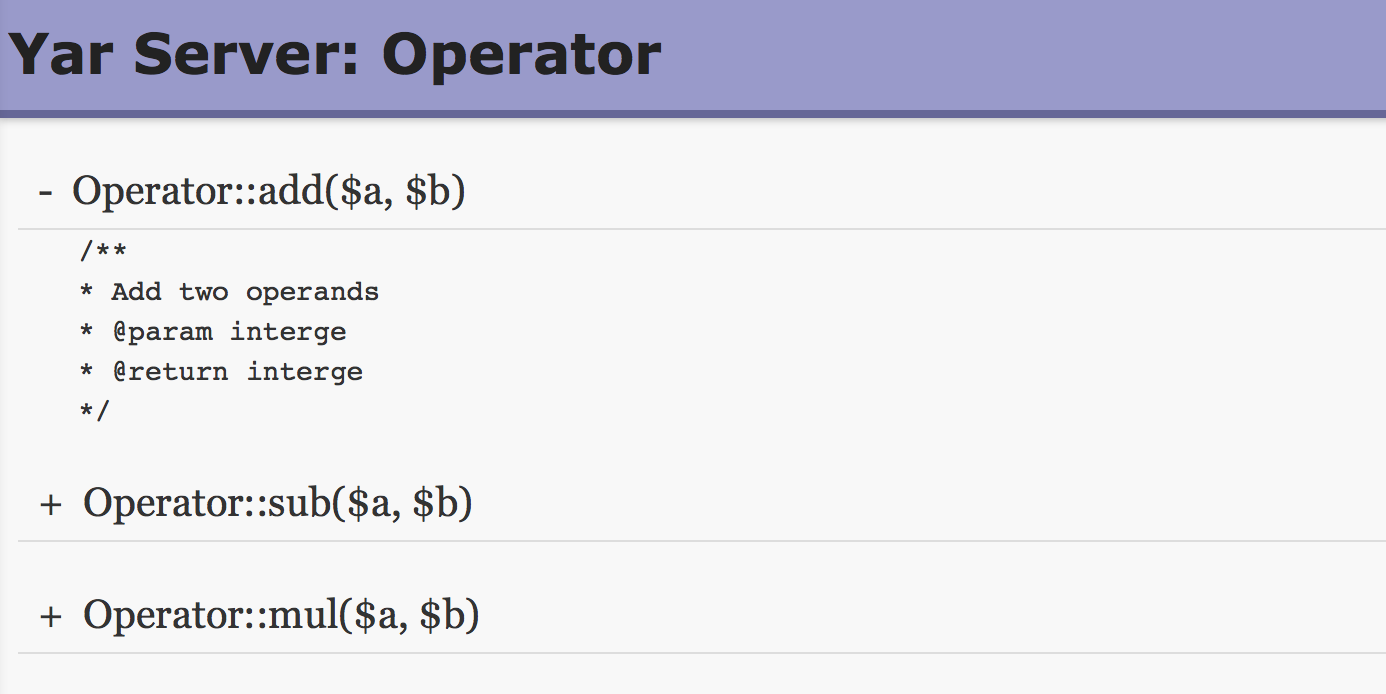
Example #2 Access the server in browser (GET request)
When a GET request is issued to the service URI — for instance by
opening it in a browser — Yar does not perform an RPC call but
renders an information page listing every public method of the
executor object together with its doc comment. This is controlled
by the yar.expose_info
directive; when it is off, a GET request fails instead.
The above example will output
something similar to:
Example #3 Yar Client Example
A Yar_Client is bound to a single service
address. Calling any undefined method on it is transparently turned
into a synchronous RPC call, so remote methods look and feel like
local ones; Yar_Client::call() does the same
thing explicitly by name.
<?php
$client = new Yar_Client("http://api.example.com/operator.php");

/* call directly */
var_dump($client->add(1, 2));

/* call via call() */
var_dump($client->call("add", array(3, 2)));

/* _add cannot be called: it is not public */
var_dump($client->_add(1, 2));
?>
The above example will output
something similar to:
int(3)
int(5)
PHP Fatal error:  Uncaught Yar_Client_Exception: call to undefined api Operator::_add() in *
Example #4 Yar Concurrent Client Example
Instead of calling services one after another,
Yar_Concurrent_Client registers several calls
first and then dispatches them all at once with
Yar_Concurrent_Client::loop(). The responses
are passed to the callback in the order they arrive, not in the
order the calls were registered.
Right after all requests have been sent, the callback is invoked
once with null arguments so that the caller knows no further
request is pending; the example below checks for this notification.
<?php
function callback($ret, $callinfo) {
    if ($callinfo == NULL) {
        /* all requests are sent, waiting for the responses */
        return;
    }
    echo $callinfo['method'], " result: ", $ret, "\n";
}

function error_callback($type, $error, $callinfo) {
    error_log("[$type] $error");
}

/* register async calls to remote services */
Yar_Concurrent_Client::call("http://api.example.com/operator.php", "add", array(1, 2), "callback");
Yar_Concurrent_Client::call("http://api.example.com/operator.php", "sub", array(2, 1), "callback");
Yar_Concurrent_Client::call("http://api.example.com/operator.php", "mul", array(2, 2), "callback");

/* send all requests and wait for the responses */
Yar_Concurrent_Client::loop("callback", "error_callback");
?>
The above example will output
something similar to:
mul result: 4
sub result: 1
add result: 3
Example #5 Yar TCP Client Example
Besides HTTP, Yar_Client can talk to Yar
compatible servers over TCP or Unix sockets, for example a service
implemented with the
» Yar C framework,
which serves the same binary Yar protocol that the PHP server uses.
<?php
$client = new Yar_Client("tcp://127.0.0.1:8600");

var_dump($client->add(1, 2));
?>



 Predefined Constants

 Yar
Yar